TSB: Nissan iPhone Connection
This bulletin applies to all Nissan vehicles equipped with a USB interface. If an iPod/iPhone related concern is verified on a vehicle while using the USB interface, perform the following steps for initial diagnosis:
- Power OFF/ON (restart/rest) the iPod/iPhone.
- Check the USB cable. Some aftermarket cables can cause issues. The best cable to use is the Apple Inc. brand USB cable. Make sure that the cable does not have a short circuit or other concern.
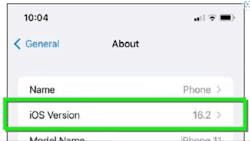
- Confirm that the latest software is installed on the iPhone/iPod.
If steps 1-3 have not resolved the issue, disconnect the cable from the USB interface. Turn the vehicle off, wait one minute then turn the ignition back to ACC or ON. Connect a different USB device to the USB interface and try to duplicate the concern. If the concern still exists with a known good USB device, refer to the applicable Electronic Service Manual for diagnosis on the USB interface and/or AV Control Unit connectors.