Toyota Doesn’t Hear Voices
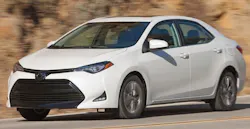
This bulletin applies to 2017-2018 Toyota Corolla vehicles. Some customers may experience a voice recognition inoperative condition or abnormal Entune operation after performing an Entune update.
Do not replace the radio for this condition. To correct this condition, Entune needs to be uninstalled from the head unit and reinstalled. Perform the following:
1. On Head Unit – Setup > General > Delete Personal Data.
2. On Phone, go to settings to add Bluetooth device.
3. On Head Unit, go to Bluetooth > Add.
4. On Phone, hit connect to establish Bluetooth connection.
5. Vehicle ignition ACC OFF/ON.
6. On Phone, ensure Entune is running.
7. On Head Unit, confirm automatically prompted for Head Unit update and accept update.
8. Confirm Voice Recognition works.