TSB: Tesla Charging Adapter Tip
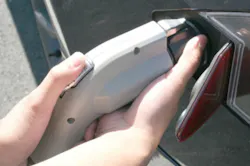
Tesla Charging Adapter Tip
The most convenient way to unplug a Tesla vehicle from a J1772 public charging station is to remove both the charging station handle and the Tesla J1772 adapter at the same time. Make sure that the vehicle is unlocked. Hold the public charging handle with one hand. Hold the Tesla adapter with the other hand. Press and hold the button on the charging handle, then pull outward with both hands in order to remove the handle and adapter together. Press and hold the button again to remove the adapter from the handle. If the charging station handle separates from the adapter, the vehicle may automatically lock the adapter in the charging port. To remove it, use the touchscreen to unlock the charge port.