Tool Review: Thinkcar Platinum 399
Content brought to you by PTEN. To subscribe, click here.
Q: How did the tool/equipment function as far as saving you time?
A: I love the high-speed scan-all-modules; I can’t say I can prove this, but it seems to me that it scans multiple modules simultaneously, which really speeds up the scan. (Note: The user’s manual says it doesn’t work on all vehicles.) I tried it on a 2019 Chevy Silverado 2500HD with 18 modules, and it took less than 15 seconds. I have found that many techs are reluctant to use the all-modules scan function as they consider it too time-consuming. I think it is really important as it reveals and allows the tech and shop to document all codes, regardless of whether the client complained about an issue or not.
Q: What kind of setup was involved before using the product?
A: There is some setup required, and I needed help from product support to get everything set up properly. I found some of the menu functions to be a bit non-intuitive, at least based on my past experience. However, product support has been extremely easy to get in touch with and very good at answering questions.
Q: How easy was it to use?
A: I am an experienced scan tool user, having used a wide variety of factory and aftermarket scanners. I’d have to put this one somewhere towards the side of slightly more difficult to learn. For example, the screenshot function is on the pull-down menu at the top. However, I did not recognize the icon at first glance, and I selected the camera function instead of the screenshot function. I notice now that I have activated it, it stays on the screen and is readily available for use.
Q: How was its packaging? Did it come with any accessories?
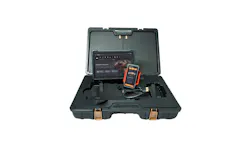
A: It came in a giant carrying case, which, in my opinion, will probably not get used much, as it is so big. It holds every connector and adapter available with the tool, which is quite a lot of accessories. It has a docking station as well as multiple connectors (even stuff for heavy duty trucks) and a borescope. An oscilloscope is available as an accessory, though I did not get it with the demo unit. As the tablet is quite large and somewhat heavy as a portable tool, I expect most techs will take advantage of the very convenient Bluetooth dongle and use the docking station, as the battery doesn’t last as long as some of the smaller tablets. I like the big screen, but it takes more battery power. As the bulk of my work is mobile diagnostics, I’m not much of a user of the docking station. The Bluetooth connection is good from quite a distance. There is a cabling connector as well, as some functions require or recommend a wired connection.
Q: Was there a manual included?
A: The user’s manual is on board the tool. It is located under “Repair Info” and designated with an icon that looks like a book. While brief, I did find out how to do some things that were otherwise pretty obscure.
Q: What features did you like?
A: The PID search function, though more common on the Android-based scan tools, is now almost a necessity, and I love it. On a late-model Ford vehicle, where you can search every PID on the engine module, and there are over 250 pids, the search window is invaluable. Tools without the search function require you to go looking for the PIDs you want in a list that may or may not be alphabetical. I can search “fuel” and get every PID containing that word, which would give me all fuel trim, fuel pressure, fuel injectors, etc, or I can narrow it down with the word “trim” if I’m looking for just fuel trim. It also allows (on some vehicles) the ability to look simultaneously at data from more than one module. This is a rare feature, in my experience. I’ve only seen it previously on the Toyota factory scan tool. It also has a dual-diagnostic feature, which I’ve never seen before on any other tool, and, if you have a second dongle, it allows you to diagnose two vehicles simultaneously.
The tablet, though heavy, appears to be extremely robust, and though I’ve already marred the screen a little bit, I think it will last a long time given proper care.
I like the fact that the dongle has its own screen. Once the car is identified, the information appears on the dongle screen as well as on the tablet.
I did not have the opportunity to use the maintenance functions, but the list of stuff it will do is longer than any I’ve seen on other scan tools.
Q: Is there any way you could think of to improve or add to this tool?
A: The reports generated on the tool are very nice and professional-looking. They can be exported via email in multiple formats, but the recordings of data do not appear to be exportable as of now.
Also, in spite of powerful data graphing capability in the data stream mode, when I ran the automatic test of the Toyota pump system EVAP test, the tool only displays numbers; it does not graph the results. I advised product support of how important this graph is to helping techs diagnose problems with EVAP systems, particularly those with automatic testing functions that can be graphed.
Q: What types of jobs/repairs did you use this tool for?
A: I used the tool on multiple diagnostic jobs for vehicles with the MIL on. One of the first vehicles I used it on was a 2020 Ram 3500 with the 6.7 diesel and codes in modules that were not in the ECM. As the vehicle has a gateway module, I was pleased to see that after registering the ThinkCar serial number on my AutoAuth subscription tool list and connecting the tool to my cellphone hotspot, the gateway module connection worked flawlessly, and I was able to access all modules to troubleshoot a problem with the DEF system. What I was really pleased with was the use of the tool to troubleshoot a 2018 Nissan Pathfinder that had just had the engine rebuilt and would set a code P0300 and a P0305. I was initially trying to focus on cylinder #5 as the vehicle does not display misfire counters in the data stream. Another of my scan tools, much higher priced than this one, would not access the mode $06 data related to ignition misfires. I was really happy to find the data available on this tool, and what it told me was that the entire bank was misfiring, though #5 had the most misfires. This discovery entirely redirected my diagnostic strategy. I was also able to record the data stream and replay it using the graphing mode on the scan tool.
Q: On a scale of 1 to 10, how would you rate this tool overall? Why?
A: I give the tool a solid eight and would have given it higher if the tool had been somewhat more intuitive to use.
Additional scan tool review questions:
Noted functions or capabilities that are beneficial / not beneficial?
As mentioned above, the search PIDs function is extremely useful on late model vehicles with seemingly endless numbers of data PIDs, as well as the high-speed scan, where available. The topology map, if trustworthy, is a powerful tool for help in troubleshooting network problems. The AI functions, which I did not use due to unfamiliarity, may someday be a just-in-time learning strategy for help for beginner techs and possibly even for advanced techs.
Most handy/beneficial function that streamlines the scan tools use during diagnosis?
Though I did not have the opportunity to use them, the maintenance functions are all accessible from a single menu. I see this as a big help when one doesn’t know whether a function is required or not, such as a CKP relearn or a throttle body relearn.
Additional add-ons you liked (if any)?
The borescope is a nice addition. The HD capability of the tool is a nice add-on for those working on Class 8 trucks, as traditionally scan tools capable of working on those vehicles are very expensive.
Type of coverage you used most frequently?
I’m a graphing data guy. I much prefer to see data in a graphical format. This tool has the ability to graph data PIDs individually, or in a combined format, which allows for comparison of like PIDs on Bank 1 and Bank 2 of a V-type engine.
The Platinum 399 from Thinkcar features upgraded hardware that includes a 14" screen, an octa-core processor, a docking station, and a four-channel oscilloscope. Operations include a high-speed scan with topology, read/clear code, graphing/recording of live data, full bidirectional communication, and J2354 support for online programming. The new AI assistant accepts voice commands and provides access to common troubleshooting tips. Coverage includes passenger cars and light trucks up to 1-ton capacity, with two years of software updates included. Electric vehicle coverage is included at no additional charge.
About the Author
 Phil Fournier
Phil Fournier
Phil Fournier has been the owner/technician at Phil’s Auto Clinic for 32 years and a working auto technician for 45 years. Fournier received his ASE Master Certification in 1982 and his AAM from the Automotive Management Institute in 1994. Currently, he works as a consultant doing diagnosis, reprogramming, and virtual instruction. Fournier currently holds 17 ASE certifications including ASE Master Auto and Master truck plus L1, L2, and L3.