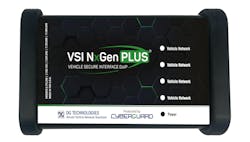
Tool Review: DG Technologies VSI NxGen PLUS
Content brought to you by PTEN. To subscribe, click here.
Q: How did the tool/equipment function as far as saving you time?
A: My initial reaction to this question is that it doesn’t necessarily fit for this particular type of equipment. What it does do is allow you to use one vehicle interface module in place of OE/factory scan tool vehicle interface modules (ie, GM’s MDI 2, Ford’s VCM 3, etc.) using the J2534 protocol(s).
But then I have to really think about it a little, and honor the question. The answer is that it saves me time because, I gotta level with you, the darn thing just works. Once I got the software and drivers installed on whatever laptop I was going to be using (I have dedicated laptops for each carline I have OE scan tool software or J2534 programming programs on), things went very smoothly. There is a lot to be said for any product that just friggin’ works.
Q: What kind of setup was involved before using the product?
A: Opening the box that the unit was shipped in required a sharp object and thus adult supervision. The soft canvas case it was in is zippered, but I was able to open it with just my fingers. An email from the company after registration gives an excellent process for the installation of the software and drivers.
Q: How easy was it to use?
A: As easy as any J2534 interface. I suppose you could argue slightly easier, as with the vehicles I used it on, it just flat out worked without any drama.
Q: How was its packaging? Did it come with any accessories?
A: As mentioned earlier, it has a soft canvas case, so if you don’t put stuff away, it gives a nice pillow for the interface and cables to lie on. The case itself is robust and would allow easy transport for a more mobile type of situation.
Q: Was there a manual included? If so, did you use the manual, and was the manual easy to understand?
A: I think every tool I’ve ever reviewed had a manual, but unless I want one of my cards revoked, I’ve never looked at one.
Okay, I kid, I kid. There is a Quick Start Guide. I will also say that support, both email and telephone, is swift, helpful, accurate, and polite.
Q: What features did you like?
A: I like the long USB cable, to be honest. The OBD cable isn’t necessarily short, but it isn’t as long as others. With the USB cable, the unit can rest inside the vehicle with the laptop/PC/tablet resting on a cart or under the hood. Some interfaces have a longer OBD cable, but shorter USB, and you end up with the interface lying on the windshield or hung up on the sideview mirror. So, using the VSI NexGen PLUS is less “clunky.”
Q: What types of jobs/repairs did you use this tool for?
A: I used it on GM, Ford, Honda, Toyota, Volvo, and Subaru vehicles for either the use of the factory scan tool for diagnostics and/or for programming of modules on said vehicles.
Q: Is there any way you could think of to improve or add to this tool?
A: I just can’t think of anything to improve. The unit feels robust and professional in quality, and like I said earlier, the thing just friggin’ works.
Q: Is there anything you had questions or concerns about in regard to the tool?
A: Negative, Ghostrider.
Q: On a scale of 1 to 10, how would you rate this tool overall? Why?
A: I would rate this a 10. I don’t give out 10’s lightly. I just don’t. But…I have to on this. I just like when things work. I like that when I call for support, I can get a hold of someone, and they seem to genuinely care. I like it when I email and promptly get an email back.
The DG Technologies VSI NxGen PLUS is a next-generation, OEM-approved diagnostic interface built for every vehicle from 1996 through today’s newest platforms. It delivers fast, reliable connectivity with full J2534 support, DoIP and D-PDU capabilities for modern vehicles to perform OEM programming, calibrations, and pre/post scans. Built with secure-by-design architecture, it helps protect your shop and customers from emerging cybersecurity threats. From older ECUs to the latest EV platforms, the VSI NxGen PLUS gives collision and repair technicians the coverage, speed, and security needed to work on any vehicle.
About the Author
 Matt Fanslow
Matt Fanslow
Matt Fanslow is the shop manager for Riverside Automotive, an all makes/all models independent repair shop in Red Wing, Minnesota. He has over 27 years of experience in the automotive industry and is an ASE Master Certified Technician (A1-A8) and an L1 Automobile Advanced Engine Performance Specialist. He also has his own podcast, Matt Fanslow Diagnosing the Aftermarket A to Z, that provides a wide-open perspective on all aspects of the automotive aftermarket from a working diagnosticians' point of view.
To listen to his latest podcast episode and others, visit mattfanslow.captivate.fm/.
In 2021, Fanslow was the recipient of the AAPEX Technician of the Year award.