Choose the right scan tools
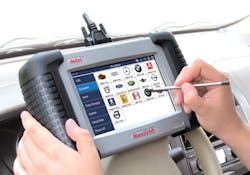
It's hard to believe, but OBDII systems have been around for at least sixteen years. A quantum leap over the capabilities of its predecessor, OBDI, the newer OBDII has taken on a persona of its own. While OBDII's main priority in life is to control and monitor powertrain-related systems, it does one other thing of vital importance for you as a service technician—communicate diagnostic-related information through a special messenger known as the scan tool. With the proper scan tool, you can interact with OBDII systems to get to the heart of problems quickly, accurately, and efficiently. This works to your advantage to increase customer satisfaction and reduce comebacks.
Terms like obsolescence, incompatibility, lack of connectivity, non-upgradeable—they all strike fear into the hearts of shop owners and technicians. Although no one ever intentionally buys diagnostic equipment for its present and future shortcomings, most everyone could do a better job of maximizing their investment by performing a little research on the equipment and its applications. To that, we dedicate this month's column on scan tool selection.
Q: We'd really like to have one scan tool for the variety of vehicles we service. Which one is best?
A: Every tech and shop owner wants one scan tool that can do it all. While there are certainly scan tools out there that can handle a wide range of vehicles, you'll need to look around a bit to find a tool that best accommodates the group of vehicles you service. Remember, a scan tool can do a whole lot more than just pull codes. It can display serial data, parameter identification data (PID), perform actuator tests, and even interact with other onboard systems such as antilock brakes, transmissions, cruise control and body control. It's not uncommon for technicians experienced with OBDII diagnostics to prefer one scan tool over another, depending on the make, model and year of cars they service.
Q: One of our techs said we should make sure any scan tool we purchase has freeze-frame capabilities. Is this a hard feature to find?
A: Freeze-frame is a standard feature built into all OBDII systems that basically takes a snapshot of data when an emissions-related diagnostic trouble code (DTC) sets. By default, some scan tools may be able to retrieve only one frame of captured data on demand. Some manufacturers build in expanded freeze-frame data capture routines that reveal more than a standard frame. To pull this expanded data, it usually requires a scan tool with expanded freeze-frame retrieval capabilities or an original equipment scan tool. To be sure, talk to your equipment rep about the freeze-frame functionality for any scan tool you're considering.
Q: It seems everywhere you look these days, there's an "app" for smart phones to perform almost any chore. Is there an app for OBDII diagnostics?
A: Yes, there are scan tool apps for both Android and Apple smart phones. Remember, a smart phone is basically a small personal computer that also makes phone calls. So, it stands to reason that a scan tool app would run on one of these devices. While these app-based scan tools have some effectiveness, they in no way measure up to the full capabilities of a dedicated scan tool.
Q: What exactly is the difference between a "generic" scan tool and a manufacturer's OE-specific scan tool?
A: Generic scan tools display the bare minimum emissions-related data as required by the US EPA. Manufacturer-specific, and many "enhanced" scan tools, go far beyond the basics of a generic scan tool and provide you with much more information to use in a given diagnostic scenario. These upscale scan tools have bidirectional capabilities, meaning that the scan tool can "talk" with, as well as listen to the vehicle's diagnostic routines.
Q: How do I know whether the scan tool I've got connected has generic or enhanced capabilities?
A: When connected to a vehicle, if the scan tool prompts you for vehicle details such as the make, model and year, then you're using a scan tool with enhanced capabilities. You see this prompt because the scan tool is accessing the enhanced data in the powertrain control module (PCM). If it were a generic scan tool, you'd see the generic data without being prompted for additional vehicle details.
Q: A scan tool I'm looking at is advertised to display Mode 6 data. How does this work?
A: Yes, Mode 6 can provide additional data for diagnostics. To use it, view the monitor status prior to repairs to see how the system failed. Then, investigate the component or data parameter related to the fault. This can help pinpoint the problem. Finally, review what it takes to enable the monitor, so you can see what it takes to pass or fail that monitor.
Q: What about Controller Area Networking (CAN) capabilities? How do I know if my scan tool can handle these systems?
A: CAN technology first appeared on cars starting in 2002 and had to be implemented on all cars by 2008. Since CAN-equipped vehicles use multiple computers that must talk to each other, it's critical that your scan tool have that same communication capability. Most full-featured scan tools today have CAN abilities, but make sure to clarify applications with your equipment rep to ensure coverage. Software updates frequently expand coverage to vehicles not previously covered in an earlier release.
Q: Isn't one scan tool as good as the next as long as it's OBD II compliant?
A: Although comparable scan tools may meet minimum OBDII code requirements, they're not all created equally. One scan tool may display more information than another one on your list. So, capabilities vary, meaning you'll want to comparison shop with precision.
Q: We're just getting into the diagnostics business and have learned that some states have replaced emissions testing with OBD II checks? What's the thinking behind this?
A: Presently, there are thirty-three states with active emissions programs, otherwise known as I/M (inspection/maintenance) programs. Of these states, the majority of them require only OBDII checks as the main component of their programs. The remaining states use a combination of tailpipe emissions tests in conjunction with OBDII checks. Despite all the buzz surrounding I/M programs and loaded-mode dynamometer testing that took place in the mid-90s, the EPA eventually changed course and took a more practical route to emissions testing. Realizing that OBDII technology did a pretty good job of self-detection when it came to failures, the tide began to shift when states ran "advisory" programs proving the effectiveness of OBDII.
Q: Which is the better choice, a PC-based scan tool or a handheld scan tool?
A: Both platforms have their advantages. Let's start with the PC-based scan tool. One advantage of the PC-based scan tool is the ability to look at data and waveforms on a relatively large screen. Since the overwhelming majority of laptops these days have displays in the 15-inch range, it provides great legibility for displayed information. With a PC-based scan tool, you can also get your software updates via the Internet. Handheld scan tools provide a lot of diagnostic power in a relatively small size and also include other test capabilities in one package. A hand-held scan tool may also be easier to hold than a PC-based version, as a PC scan tool requires a flat spot to position the laptop. Of course, the arguments for either side go out the window if you decide to go with an OE scan tool. OE scan tools come in one platform or the other depending on the manufacturer, so you won't have the luxury of choosing a platform in this case.
Q: What "extras" should we consider when making a scan tool purchase?
A: Make sure you have all the proper cables and adapters for the cars you service. Confirm how software updates are handled and at what price. Make sure to check into what training is included to get your staff up to speed quickly. Finally, check into warranty coverage and what can be done to keep your shop productive in the event your scan tool dies on a busy day.
Q: We specialize in a couple of makes of imports. A rep for an aftermarket scan tool claims their tool will display everything we could hope for when servicing these imports. A technician friend of mine told me to go with the OE scan tool to be sure. Which way do I go?
A: In an ideal world, a factory scan tool for each make you service would give you the most depth in diagnostics. In the real world, few can afford the price tag associated with an arsenal of factory scan tools. That being the case, evaluate several different aftermarket scan tools to see whether they provide the diagnostic depth you need. Record your findings. You may find that one scan tool stands out among the others for the unique mix of vehicles you service.
Scan tool selection is something you shouldn't take lightly. Use patience during the selection process and it will pay dividends both now and into the future.